Best OBS Alternatives for Mac Users in 2026: Easier, Smarter, and More Powerful
Live streaming has become one of the most powerful ways to connect with an audience — whether you’re a content creator building a YouTube following, a church reaching its congregation online, a sports team broadcasting games, or a business hosting virtual events. And for years, OBS Studio has been the go-to free tool for streamers worldwide.
But here’s the thing: being free and being easy are two very different things.
Mac users, in particular, have long wrestled with OBS. The software is undeniably capable, but it comes with a steep learning curve, a plugin-heavy setup process, and an interface that can feel downright intimidating for anyone who isn’t technically inclined. Spend a few hours trying to configure scenes, set up remote guests, and manage multiple cameras in OBS on a Mac, and you’ll quickly understand why so many people go searching for something better.
The good news? In 2026, there are excellent OBS alternatives built specifically with Mac users in mind — tools that deliver professional broadcast quality without requiring you to have a computer science degree to operate them. In this guide, we’ll walk you through the best options available, break down what makes each one unique, and help you figure out which platform is the right fit for your needs.
Why Mac Users Are Moving Away from OBS
To be fair to OBS, it’s a remarkable piece of software. It’s open-source, completely free, and supports virtually every streaming platform imaginable. For technically skilled users on any operating system, it remains a solid choice.
But “technically skilled” is the key phrase there.
Mac users looking to produce professional live content often run into a familiar wall with OBS. Setting up a multi-camera stream requires third-party plugins that aren’t always straightforward to install or configure. Inviting a remote guest for an interview? That requires yet another plugin or an entirely separate tool. Managing graphics, overlays, and brand assets means diving deep into scene configurations that can take hours to get right.
Beyond the complexity, OBS also tends to be resource-hungry. On older Mac hardware or during longer streams, users frequently report performance issues. And because OBS wasn’t designed exclusively for Mac, it doesn’t always take full advantage of Apple’s ecosystem — meaning you can’t easily use your iPhone or iPad as a wireless camera without additional workarounds.
For hobbyists who enjoy tinkering, OBS’s flexibility is a feature. For creators, educators, businesses, and community organizations who need to get live and look professional quickly, it often becomes a frustrating barrier.
What to Look for in an OBS Alternative
Before diving into the tools themselves, it’s worth establishing what a strong OBS alternative for Mac should actually offer. Here are the key features to evaluate:
Multi-camera support — The ability to switch between multiple camera angles live is what separates a broadcast from a basic webcam recording. Look for tools that let you use iPhones, iPads, or external cameras without complicated hardware setups.
Remote guest capability — Whether you’re hosting interviews, panel discussions, or co-streams, bringing remote guests into your broadcast is essential for modern creators.
Multi-platform streaming — Streaming to YouTube alone is no longer enough. The best tools let you go live on YouTube, Facebook, Instagram, TikTok, and more — all at the same time.
Brand customization — Overlays, lower thirds, logos, and branded graphics are what make a stream look polished and professional rather than amateurish.
Ease of use — If you’re spending more time troubleshooting your setup than actually creating content, that’s a problem. A good OBS alternative should get you from setup to live in minutes, not hours.
Monetization tools — For creators looking to earn from their content, built-in support for donations, paid tickets, and subscriptions is a major plus.
The Best OBS Alternatives for Mac in 2026
1. Switcher Studio — Best Overall for Mac Users
If you’re looking for the single best OBS alternative for Mac in 2026, Switcher Studio is the clear frontrunner. Built specifically for Mac and iOS, it combines professional-grade production features with a clean, intuitive interface that makes multi-camera live streaming accessible to virtually anyone.
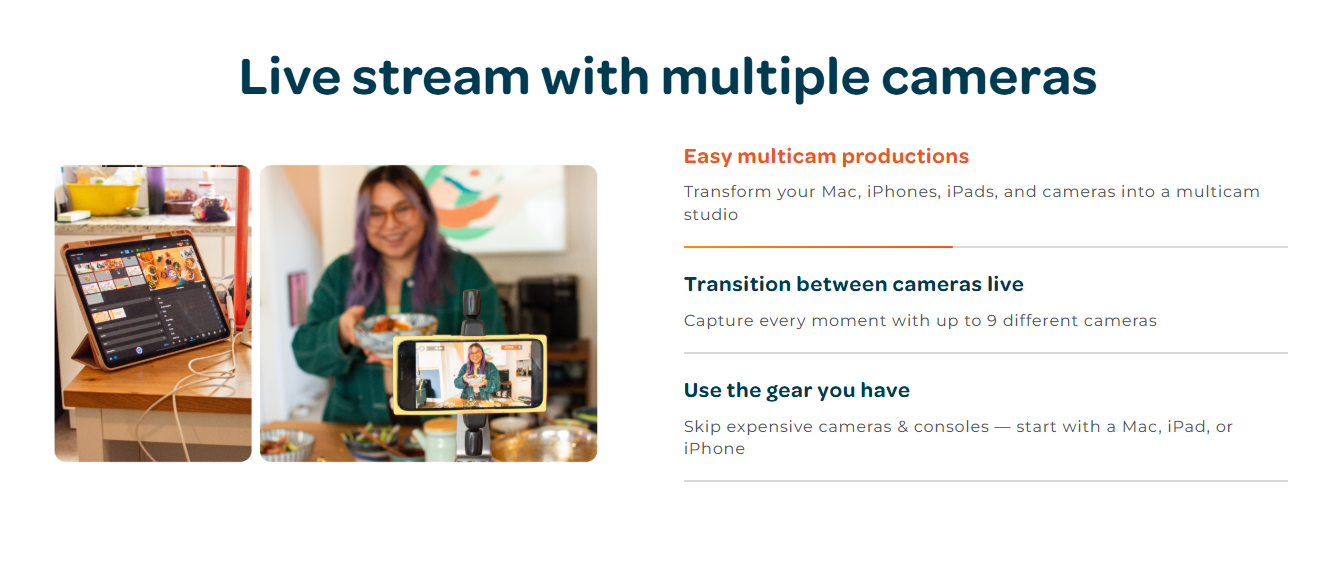
What makes Switcher Studio stand out is its seamless integration with Apple devices. Instead of buying expensive dedicated cameras or a hardware video switcher, you can turn your existing iPhones and iPads into wireless camera feeds — supporting up to 9 different camera angles. This alone is a game-changer for small teams and solo creators who want a polished multi-camera broadcast without the hardware costs.
Switcher’s feature set goes well beyond basic streaming. You can stream simultaneously to YouTube, Facebook, Instagram, TikTok, X (formerly Twitter), and more from a single interface. Live comments from Facebook and YouTube appear in one unified view, so you never miss a moment to engage with your audience. Custom graphics templates, branded overlays, lower thirds, scoreboards, sound effects, and pre-recorded video inserts give you full production control.
One of the most compelling additions in recent years is Switcher’s built-in monetization suite. You can collect donations through PayPal, Givelify, or Tithe.ly, sell tickets to live events, and offer pay-to-view videos or subscription access — all within the platform. Crucially, Switcher doesn’t take a percentage of your earnings; it charges a flat $0.99 per transaction, which means more of what you earn stays with you.
For organizations like churches, schools, sports teams, and podcasters, Switcher offers use-case-specific tools that make it remarkably easy to produce content that looks tailored and professional rather than generic.
The learning curve is minimal. The platform is rated 4.6 out of 5 on the Apple App Store based on over 1,300 reviews, and its users consistently praise how quickly they were able to produce professional-looking streams. A 14-day free trial is available with no credit card required.
Best for: Creators, churches, educators, coaches, sports broadcasters, businesses, and anyone who wants professional results without a complicated setup.
2. Ecamm Live — Best for Dedicated Mac Desktop Streamers
Ecamm Live is a Mac-native streaming application with a loyal following among content creators and YouTubers who are deeply embedded in the Apple ecosystem. It integrates natively with macOS, offering excellent compatibility with Mac hardware and software tools.
Ecamm’s standout features include a clean interview mode for hosting remote guests, strong virtual camera support (which makes it easy to use as a camera source in Zoom or Google Meet), and a well-designed overlay and graphics system. Live comment integration lets you pull in audience messages on screen during a broadcast.
The interface is polished and Mac-friendly, which makes it more approachable than OBS for desktop-focused streamers. However, it doesn’t match Switcher Studio’s iOS ecosystem integration — so if you want to use iPhones or iPads as wireless cameras, you’ll need additional workarounds. Ecamm also has a higher base price and can become expensive once you factor in optional add-ons.
Best for: Mac-based solo creators who primarily stream from their desktop and want a polished, native Mac experience.
3. StreamYard — Best for Simplicity and Browser-Based Streaming
StreamYard takes a completely different approach: it runs entirely in your browser, requires no downloads or installations, and is arguably the easiest streaming tool available today. You log in, set up your stream, invite guests via a shareable link, and go live.
For interview-heavy content — think podcast-style conversations, panel discussions, or collaborative live shows — StreamYard is exceptionally good. Multi-platform streaming to YouTube, Facebook, LinkedIn, and others is built in, and the guest management system is seamless enough that non-technical guests can join your stream with minimal friction.
The trade-off is flexibility. StreamYard doesn’t offer the depth of scene customization or production control that Switcher Studio or Ecamm provide. Multi-camera support is limited compared to dedicated software solutions. And because everything runs through a browser, you’re somewhat dependent on internet reliability for a smooth experience.
Best for: Creators and business professionals who prioritize simplicity and run interview or conversation-style shows.
4. Wirecast — Best for Enterprise and Professional Production Teams
Wirecast is one of the most powerful live production tools available, offering broadcast-level features including advanced video switching, virtual sets, replay capabilities, and highly customizable production controls. If you’re running a large-scale event production or a professional broadcast operation, Wirecast can handle it.
The catch is that Wirecast comes with a significant price tag and a learning curve that’s comparable to, and in some ways steeper than, OBS. It’s not a tool designed for quick setup or casual streaming — it’s a professional production system that requires investment of both time and money.
Best for: Professional broadcast teams and enterprise-level production operations with dedicated technical staff.
Head-to-Head Comparison
| Feature | Switcher Studio | Ecamm Live | StreamYard | Wirecast |
|---|---|---|---|---|
| Ease of Use | ⭐⭐⭐⭐⭐ | ⭐⭐⭐⭐ | ⭐⭐⭐⭐⭐ | ⭐⭐⭐ |
| Multi-Camera | Yes (up to 9) | Yes | Limited | Yes |
| iOS Camera Integration | Yes (native) | Limited | No | No |
| Remote Guests | Yes | Yes | Yes | Yes |
| Multi-Platform Streaming | Yes | Yes | Yes | Yes |
| Built-in Monetization | Yes | No | No | No |
| Mac-Native | Yes | Yes | Browser-Based | Yes |
| Free Trial | 14 days | 14 days | Free tier available | 30 days |
Which OBS Alternative Should You Choose?
Choose Switcher Studio if you want the best overall balance of power and simplicity. It’s the strongest choice for creators who need multi-camera production, remote guests, professional graphics, and the ability to stream to multiple platforms simultaneously — all without spending hours configuring plugins or troubleshooting software. If you’re in the Apple ecosystem and want to turn your existing devices into a professional broadcast studio, there’s nothing else quite like it.
Choose Ecamm Live if you’re a solo Mac creator who streams primarily from your desktop and values a native macOS experience. It’s a polished tool that works extremely well within its strengths.
Choose StreamYard if your priority is maximum simplicity and you run interview-style or conversation-focused content. It’s the fastest way to go live with minimal technical friction.
Choose Wirecast if you’re part of a professional production team with the budget and technical resources to get the most out of a broadcast-grade platform.
Final Verdict
OBS Studio will always have a place in the streaming world — it’s free, powerful, and endlessly customizable for those willing to invest the time. But for Mac users who want professional results without the technical headaches, there are now far better options available.
Switcher Studio stands out as the best OBS alternative for Mac in 2026. Its combination of seamless iOS device integration, multi-camera production tools, multi-platform streaming, audience engagement features, and built-in monetization makes it one of the most complete live streaming platforms available at any price point. Whether you’re a creator sharing your passion, a church connecting with its community, a sports organization capturing every moment, or a business running virtual events, Switcher gives you the tools to produce broadcasts that look and feel genuinely professional.
The best part? You can try it free for 14 days with no commitment required. Visit switcherstudio.com to get started.
Frequently Asked Questions
Is OBS good on Mac in 2026? OBS works on Mac and remains free, but many users find it more difficult to set up and use compared to modern streaming platforms. The plugin-dependent workflow and steep learning curve make it a less ideal choice for creators who want to launch quickly and look professional.
What is the easiest OBS alternative for Mac? StreamYard is the easiest overall due to its browser-based setup. However, for creators who want ease of use and professional production features like multi-camera support, Switcher Studio is the best balance of simplicity and capability.
Can I use multiple cameras on a Mac without OBS? Yes. Switcher Studio allows you to use up to 9 camera angles simultaneously — including iPhones and iPads as wireless cameras — without any complicated OBS configurations or hardware purchases.
Is Switcher Studio available on Mac? Yes. Switcher Studio is available for both Mac and iOS, and the two platforms work together seamlessly. You can use your Mac as the main production hub while using iPhones or iPads as camera sources.
Does Switcher Studio let you stream to multiple platforms at once? Yes. Switcher Studio supports simultaneous streaming to YouTube, Facebook, Instagram, TikTok, X, Twitch, and more from a single session.
Can I make money with Switcher Studio? Yes. Switcher includes built-in monetization tools including donation collection via PayPal, Givelify, and Tithe.ly, as well as paid ticket sales for live events and subscription content. Switcher charges a flat $0.99 per transaction and does not take a percentage of earnings.
How much does Switcher Studio cost? Switcher Studio offers a 14-day free trial with no credit card required. Paid plans are available after the trial period. Visit switcherstudio.com/pricing for current pricing details.
What’s the best OBS alternative for churches and live events? Switcher Studio is widely used by churches, schools, and live event organizers. Its multi-camera support, branded graphics, and simultaneous multi-platform streaming make it ideal for organizations that need to look professional without a large technical team.
Is there an OBS alternative that works on iPhone or iPad? Yes. Switcher Studio is built specifically for Mac and iOS, allowing you to use your iPhone or iPad both as the primary streaming device and as additional camera sources.